
POS Hardware Options and Quotations from China
Tesp helps overseas B2B buyers compare practical POS hardware options before requesting a sample or quotation. Use this page when you know the product category and need clearer model, configuration, accessory or quantity information.
Start with POS terminals, self-checkout kiosks or retail scales, then share the operating system, key peripherals, quantity and destination market needed to discuss an available option.
Available Hardware Options
Compare practical POS hardware options by product category, configuration range and stated requirements.
Configuration Baseline
Clarify operating system, screen size, ports, peripherals, accessories and quantity before requesting a quotation or sample.
Sample Information
Confirm available model, accessories, requested photos or videos, sample quantity and buyer-side evaluation points.
Product Details for Your Decision
Keep model information, configuration options and open questions clear before choosing the next purchasing step.
What POS Hardware Options and Quotations Include
For POS hardware purchasing, the first question is not only which product category you need. You also need to know whether a practical model is available with the required operating system, screen layout, ports, peripherals, accessories, sample quantity and destination-market details.
This page helps turn a rough POS hardware requirement into a clearer model and configuration discussion before a sample or small-batch order.
Product Direction
POS terminals, self-checkout kiosks, retail scales and related checkout hardware.
Configuration Direction
Operating system, CPU level, screen size, ports, printer, scanner, display, mounting and accessories.
Next Purchasing Step
Available model options, sample configuration, expected quantity, quotation inputs and open product questions.
What to Confirm Before Requesting Hardware Options
Use these fields to make a POS hardware request practical. You do not need a complete specification; the goal is to receive relevant model options instead of a generic catalog.
| Input | What to Share | Why It Matters |
|---|---|---|
| Product Type | POS terminal, self-checkout kiosk, retail scale, cash drawer, printer, scanner or mixed checkout hardware. | The product type determines which available models and configurations are relevant. |
| Operating System | Android, Windows, Linux-based system, expected processor level, memory, storage and software workload. | System direction affects available motherboard, drivers, application environment and model options. |
| Hardware Layout | Screen size, single or dual display, touch requirement, port layout, mounting format and accessory position. | Physical layout helps identify whether a standard model can fit the stated checkout use. |
| Peripheral Needs | Printer, scanner, customer display, scale, NFC reader, payment mounting position, cash drawer port and other modules. | Peripheral needs narrow the model and configuration discussion before a sample request. |
| Quantity | Sample quantity, small-batch quantity, replacement quantity or repeat-order estimate. | Quantity affects available options, sample planning, quotation and OEM discussion. |
| Market Context | Destination country, plug type, label language, local requirements and buyer-side software testing needs. | Market context helps identify questions that should be confirmed before a sample or quotation is accepted. |
Hardware Option Review Matrix
This matrix helps turn broad product information into a practical shortlist. Review the available model, configuration, accessories and sample path before deciding which option should move forward.
| Review Area | Common Buying Risk | What to Confirm |
|---|---|---|
| Product Fit | A broad catalog does not show whether the available model fits the required POS hardware category or checkout use. | Available product type, model direction, screen format, mounting style and relevant accessories. |
| Model Options | Catalog photos may not show the available CPU, operating system, screen, port or peripheral combinations. | Practical model options and which configurations are available for a sample or small-batch order. |
| Configuration Baseline | Broad system or port claims may not match the stated application or peripheral requirements. | Operating system, processor, memory, storage, port layout, accessories and available driver-related information. |
| Sample Path | A quotation may not state sample availability, accessory inclusion, requested media or lead-time details. | Sample availability, configuration, accessories, requested photos or videos and expected sample timing. |
| Next Step | Product, sample, OEM and existing-order questions can become mixed together before the basic model is clear. | Whether the next useful step is a quotation, sample request, OEM discussion or existing-order support. |
Practical Steps Before Requesting a Sample
Review suitable POS hardware options by product type, configuration, quantity and destination market. The goal is to identify a practical model and quotation path before you request a sample.
Hardware Requirements
Confirm product type, operating system, required modules, quantity and destination market.
Available Hardware Options
Compare practical model options by category, configuration range, accessories and stated requirements.
Configuration Review
Confirm available operating system, CPU, memory, storage, port layout, screen size, peripherals and accessories.
Sample Decision
Organize model options, requested media and open questions so your team can decide whether to request a sample.
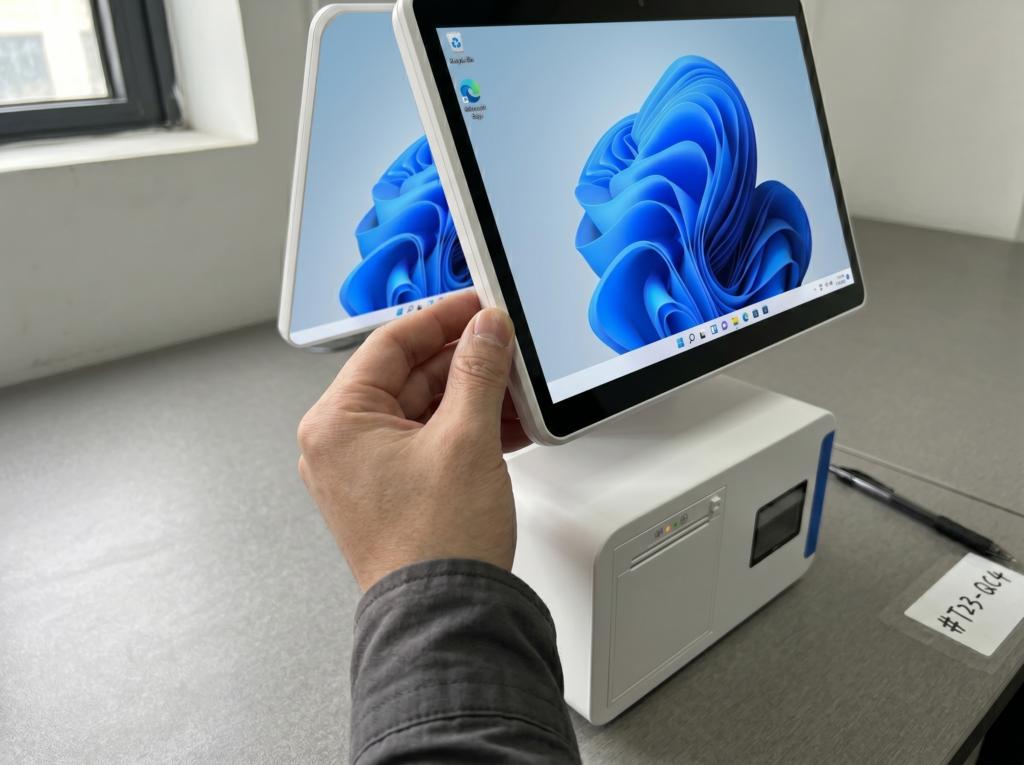
Information to Confirm Before Requesting a Sample
Before requesting a sample, organize the product information that affects whether an option is worth pursuing: available model, configuration range, accessories, product photos, sample availability and open questions.
The goal is to create a usable model shortlist for buyer-side review. Final software compatibility and local requirements should be confirmed by the buyer’s technical team and relevant local professionals.
-
Step 1: Product and Accessory Evidence
Request practical product, port, accessory and packaging photos when they help compare available options. -
Step 2: Configuration Availability
Confirm available operating system, CPU, screen, ports and peripheral options before a sample configuration is selected. -
Step 3: Open Questions for the Sample
Keep model details and unresolved questions clear so the buyer can decide whether to request a sample.
Hardware Requirements and Buyer Confirmation Points
What to Share for Hardware Options
- POS hardware category and checkout application
- Operating system direction, screen layout, ports and peripherals
- Accessories, expected quantity and destination market
- Any model, configuration or product information already collected
- The practical question you need answered before requesting a sample or quotation
Buyer Confirmation Points
- Final software compatibility and integration testing
- Local certification, import, compliance and installation requirements
- Final approval of product, price, lead time, quantity and delivery terms
- Whether the shortlisted option should move to sample evaluation
- Compatibility, compliance and commercial outcomes
Hardware Options FAQs
Can I request POS hardware options from China?
Yes. Tesp can discuss available POS terminals, self-checkout kiosks, retail scales and related checkout hardware based on your product type, configuration needs, quantity, destination market and sample plan.
What information should I send before comparing hardware options?
Please share the product category, operating system direction, screen size, required ports, peripherals, accessories, sample or order quantity, destination market and any software or installation constraints you already know.
How are hardware options compared?
Options are compared by product category, available configuration range, accessory availability, sample path and the open questions that matter for the stated requirements. The goal is a practical model shortlist, not a generic catalog.
Can I request a quotation before ordering a sample?
Yes. Share the product category, configuration requirements, expected quantity and destination market. A sample may still be needed before final order approval when the hardware needs buyer-side evaluation.
Can I discuss standard OEM details before a sample?
Tesp can discuss practical OEM options such as logo, packaging, labels, boot screen and standard configuration availability. Detailed OEM confirmation should follow once the product direction and sample path are clearer.
What happens after a model is shortlisted?
The usual next step is to request a sample. Use POS Hardware Samples to confirm the sample configuration, accessories, requested photos or videos and buyer-side review points before shipment.
When you are ready to request a sample, continue to POS Hardware Samples to confirm the configuration, accessories and buyer-side review points before shipment. For standard branding details, review OEM & Private Label. To compare the full purchasing path, return to the POS hardware support overview.
Request POS Hardware Options
Share the POS hardware category, operating system direction, configuration needs, quantity and destination market you are considering. We will review the most practical next step for available hardware options, a sample or OEM discussion.